

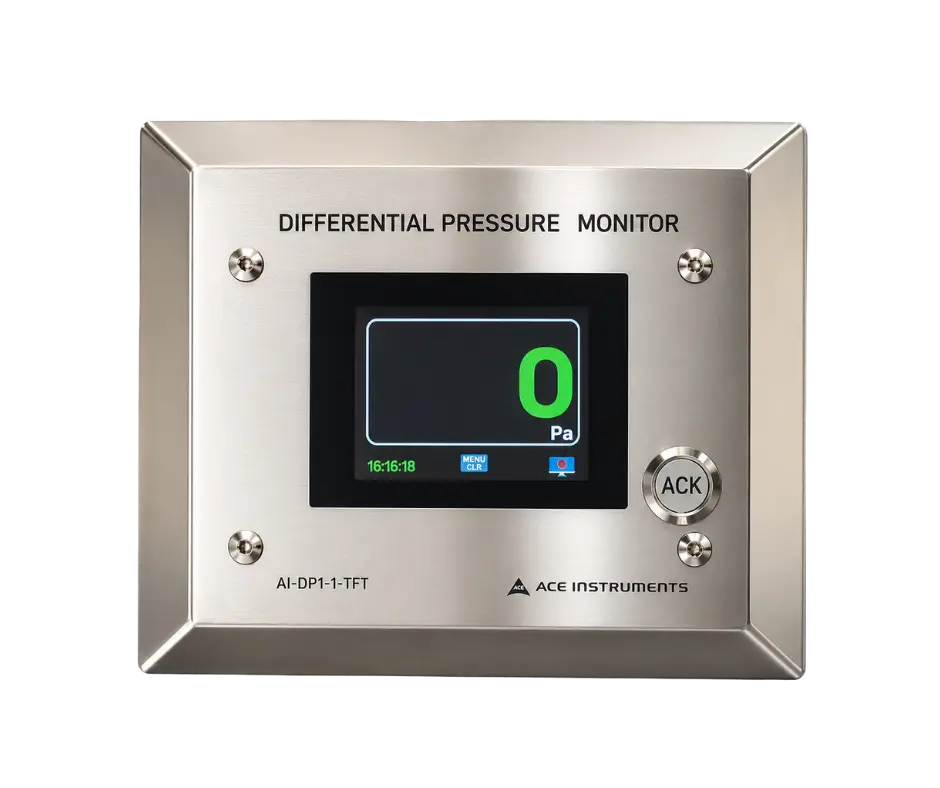
Cleanroom Differential Pressure Monitor with TFT Display (AI-DP1-1-TFT)
A digital differential pressure monitor that replaces the analog needle gauge. A 3 inch TFT screen, a built-in sensor, a high and low buzzer alarm and optional RS485 Modbus, in a slim back box made for modular walls.

Continuously monitor differential pressure with real time sensing & alerts
The AI-DP1-1-TFT is a digital differential pressure monitor for laminar airflow cabinets, cleanrooms, biosafety cabinets and AHUs. It replaces an analog needle gauge with a 3 inch TFT screen, a built-in sensor, a high and low buzzer alarm with touch acknowledgement, and optional RS485 Modbus output.
Fitted in a modular or brick wall with a stainless steel front plate over an M.S. back box, it keeps wall surfaces smooth and easy to clean.
Measure, display, alarm, report
The sensor measures the pressure difference between two points and shows it on the display. The reading turns red when it leaves its configured range and the buzzer sounds. Units switch between Pascal and mm.W.C. from the keypad. Optional isolated 4 to 20 mA or RS485 Modbus outputs send readings to a BMS, SCADA system or PLC.
Red on screen, quiet once seen
For a high or low violation the display turns red and the buzzer sounds together. Staff silence the buzzer by touch after noting the condition. Common causes include open doors, fan failure, blocked filters and HVAC faults.
Built for controlled environments
Built-in Differential Pressure Sensor
Digital logging of the pressure difference, with no separate transmitter needed
3 Inch Color TFT Display
A single-row color screen that is easy to read from a distance
Visual Red Alarm
The reading turns red when it leaves the configured range
High and Low Buzzer Alarm
Audible alert for high or low violations, with touch acknowledgement
Pascal or mm.W.C. Units
Switch the displayed unit from the keypad
Optional Isolated 4 to 20 mA Output
An analog route to the pressure value for equipment with analog inputs
Optional Isolated RS485 Modbus
Sends readings to BMS, SCADA and PLC systems
40 mm Slim Back Box
A shallow M.S. back box made for modular cleanroom walls
Modular or Brick Wall Mounting
Stainless steel front plate sits flush over the back box
Where the AI-DP1-1-TFT is used
Laminar Airflow Cabinets
Confirms the pressure condition that supports a protected work zone
Cleanrooms and ISO Classified Areas
Tracks the pressure between rooms, corridors and airlocks, so air keeps moving from cleaner areas toward less clean ones
Biosafety Cabinets
Monitors the pressure that keeps hazardous material contained and protects operators
Air Handling Units
Monitors filter and fan pressure, so a rising value tells maintenance when to look
Pharmaceutical and GMP Areas
Shows whether each classified production area holds the pressure that protects it
Hospital Isolation Rooms and Theatres
Lets staff check that a room keeps its intended pressure relationship with neighboring spaces
Pass Boxes and Airlocks
Verifies the pressure step at the transfer points between zones
Why differential pressure monitoring matters
Understanding Pressure Cascades
A cascade is the planned pressure difference between adjoining rooms, so air flows from cleaner to less clean areas, for example Grade B to C, Grade C to D, or clean corridor to service corridor. One monitor per boundary shows where a problem starts, and continuous digital monitoring catches drift as it happens.
Positive and Negative Pressure
The same instrument serves both directions. Positive pressure rooms keep outside air out, and negative pressure rooms keep hazardous air in. Your design and validation documents determine which applies.
Choosing the Right Pressure Range
The standard range is -100 to +100 Pa using the built-in sensor, and other ranges are available on request. Cleanroom cascades are often around 10 to 15 Pa between grades, but your protocol sets the actual value. For larger pressures, such as AHU filter drop, confirm the range before ordering.
Integration
Connects to BMS, PLC, SCADA and cleanroom monitoring platforms through isolated 4 to 20 mA or RS485 Modbus, so pressure data can sit alongside temperature and humidity records.
Choosing between display and enclosure variants
None of these is a functional upgrade over the others. Confirm the outputs for the specific model you order.
| Variant | Display | Best for |
|---|---|---|
| AI-DP1-1 and AI-DDPG | 4 digit LED readout | A simple numeric reading |
| Differential Pressure Indicator (LCD) | Backlit graphic LCD | A clear display with engineering units |
| AI-DP1-1-TFT (this model) | 3 inch TFT | A visual alarm that turns red and reads from a distance |
| DDPG TFT | TFT display | The same visual alarm where the DDPG enclosure format is specified |
Technical specifications
Back box 105 (W) x 100 (H) x 40 (D) mm
Supports regulated facilities
The monitor supports continuous monitoring expectations under ISO 14644-2, aligns with qualification testing under ISO 14644-3 through its offset provision and 4 to 20 mA output, and provides pressure data for EU GMP Annex 1 records through BMS or SCADA. Ace Instruments manufactures it under an ISO 9001:2015 quality management system.
The acceptable range is set by your product or process requirements, not by ISO 14644 itself, and the monitor does not replace your qualification protocol.
Why teams choose it
A clear reading from a distance, immediate alerts on set point violations, straightforward integration with existing systems, and a slim back box that keeps wall surfaces smooth and cleanable.
Frequently asked questions
1. What is the AI-DP1-1-TFT?
The AI-DP1-1-TFT is a digital differential pressure monitor for continuous pressure monitoring in cleanrooms. Its color TFT display helps you verify the pressure relationship with adjacent areas.
2. Why is differential pressure important in a cleanroom?
It controls the direction of airflow between rooms of different cleanliness, so unwanted air stays out of the cleaner space.
3. What does the monitor measure?
It measures the pressure difference between its two connection points and shows the result on the display.
4. How does the TFT screen help operators?
It shows the current reading and whether it is within range. The reading turns red during a violation, so a problem is visible from across the room.
5. Where should the monitor be installed?
Fit it where staff can see it easily, with the sensing tubes routed to the monitored rooms without leaks.
6. How should the tubing be installed?
Connect it to the high and low pressure points, keep it free of kinks and leaks, and route it clear of damage or unwanted pressure effects.
7. Can it be installed in modular panels?
Yes. The back box is about 40 mm deep and suits both modular and brick walls.
8. Can it monitor pressure between a cleanroom and a corridor?
Yes, and the same applies to airlocks and gowning rooms. How you connect it depends on which space should be held at the higher pressure.
9. Can it be used in negative pressure rooms?
Yes. It verifies that the room holds the required pressure relative to its surroundings.
10. How does it help identify pressure problems?
Pressure changes can point to airflow imbalance, door effects, HVAC faults, filter loading or control issues. Continuous monitoring catches them sooner than periodic checks.
11. Can alarms be configured?
Yes. Built-in high and low alarms include a buzzer with touch acknowledgement, and the reading turns red during a violation.
12. Can pressure be shown in Pascal or mm.W.C.?
Yes. You can switch between the two units from the keypad.
13. What should guide the choice of pressure range?
Choose a range that covers normal operating pressure with enough resolution. A range that is too large reduces sensitivity, and one that is too small may not cover the operating condition.
14. Can it connect to a BMS?
Yes, through its communication or output options. This allows central viewing, alarms, trending, documentation and HVAC control.
15. Does it support RS485 Modbus?
Isolated RS485 Modbus is available as an option for digital integration. Please confirm the exact configuration against the model specification.
16. Can it monitor 24x7?
Yes. It is intended for continuous monitoring during production, storage, testing and other controlled operations.
17. Which facilities can use it?
Pharmaceutical plants, laboratories, hospitals, operating theatres, isolation rooms, biotech facilities, medical device and electronics manufacturing, and other controlled environments.
18. Can it be used across different cleanroom classifications?
Yes. Match the range and configuration to the room classification, HVAC design and monitoring requirements.
19. How does it support compliance?
It provides continuous local measurement against defined limits. When connected to a central system, values can be recorded for management, investigation and quality documentation.
20. Does it need calibration?
Yes. Verify and calibrate it periodically, according to your accuracy requirements and quality procedures.
21. Can it replace manual checks?
It reduces the need for frequent manual readings, but your established verification, calibration and documentation procedures still apply.
22. How does an indicator differ from a monitor?
An indicator gives a local reading. A monitor adds a TFT display, alarms, communication and automation integration.
23. How does the TFT version differ from the LED version?
Both measure and alarm. The TFT shows the reading on a 3 inch screen that turns red during an alarm, while the LED version has a 4 digit readout. The TFT is better for viewing from a distance.
24. Who typically uses it?
Facility managers, pharmaceutical manufacturers, HVAC contractors, consultants, validation and QA/QC teams, hospital engineers, lab managers and BMS integrators.
25. What are the main benefits?
Clear digital readings, visual alerts, continuous monitoring, suitability for positive and negative pressure, and integration with building systems.
26. How do I select the right monitor?
Consider the required range, display, alarms, communication, outputs, installation location and application. The Cleanroom Monitors team can help with configuration.
Need help choosing?
Tell us your pressure range, display and mounting arrangement and our application engineers will configure the right AI-DP1-1-TFT for you.
Exceptional Instruments That Surpass Your Technical Expectations
Powerful, customized solutions to suit your unique cleanroom monitoring needs
Discover moreGain insight into your IAQ solution and know technical specifications