

PoE Digital Clocks with Touch Screen
One Ethernet cable gives the clock its power and its time. PoE digital clocks that follow your server's time, so the clocks staff read match the systems that record their work.
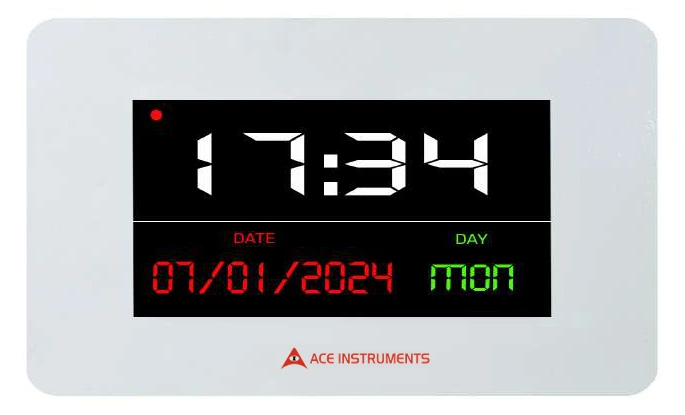
Power and time updates from your server's Ethernet connection
Ace Instruments makes PoE network clocks that draw both power and time updates from your server's Ethernet connection. PoE clocks are energy efficient and result in simpler installation with less cabling utilization. You benefit from the hassle free installation and maintenance of these synchronized clocks.
PoE is a mature and growing technology used to conveniently deliver power through Ethernet cables to a load, rather than adding additional power cords. It is the technology that allows devices to get both data and power over one single standard network cable. PoE is defined by the IEEE 802.3 Ethernet standards, with IEEE 802.3af, 802.3at, and 802.3bt specifying how power is delivered over the cable.
One cable, power and time
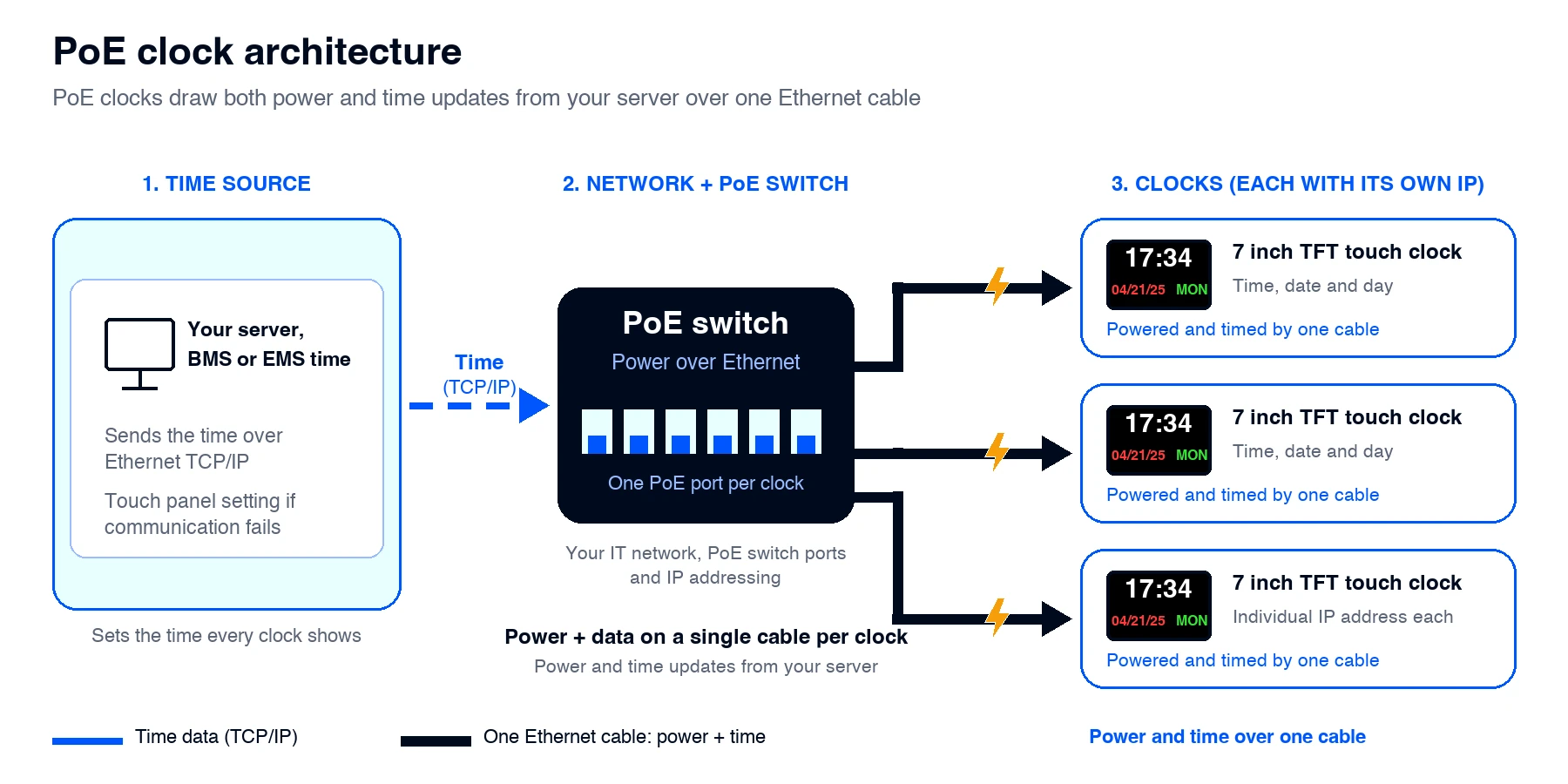
The clock connects to a PoE switch through a standard network cable. That single cable carries both the electrical power and the network communication. The time is programmed over Ethernet TCP/IP communication using your server, BMS, or EMS time, so every clock that follows the same source shows the same time. Each clock is a device with its own IP address. In case of communication failure, the time can be set at the touch panel.
Two lines, all the detail
The 7 inch full color TFT touch screen shows hours and minutes on line 1, and the month, date, year, and day on line 2.
How the clocks connect to your network
Your server, BMS, or EMS sends the time over Ethernet TCP/IP. The PoE switch passes it to each clock and powers every clock through the same cable. Each clock is a device with its own IP address.
In regulated environments, time is data
Batch records, calibration logs, and deviation reports all carry times, and some are written by hand while others are stamped by a computer. When the wall clock that staff read is on the same server time as the electronic systems, the two kinds of record agree more easily.
It helps people, not systems
A clock does not make a system compliant, and it does not replace the time controls of your computerized systems. It helps the people who work around those systems write times that match the record.
Involve your network team early
PoE clocks depend on your IT network. Consider these points:
PoE switch ports
Each clock needs a PoE capable switch port. Count the clocks and leave spare ports.
IEEE PoE standard
Use a PoE switch that follows the IEEE 802.3 PoE standards (802.3af, 802.3at, or 802.3bt) and has enough power per port. Confirm the clock's power class with us.
IP addresses
Each clock is a device with its own IP address on the network.
Time source
Decide which server, BMS, or EMS time the clocks will follow.
Network settings
Check PoE availability, firewall rules, and IT policy before installation.
If communication fails
The time can be set at the touch panel in case of communication failure.
Flush stainless steel front plate
The enclosure is a modular wall or brick wall mountable M.S. back box with a front flush stainless steel plate. The front plate carries a polycarbonate sticker.
Compact and flush
Front SS plate: 150 (H) x 220 (W) mm
Back MS box: 115 (H) x 195 (W) x 45 (D) mm
Built for critical environments
Power and Time Over One Cable
PoE clocks draw both power and time updates from your server's Ethernet connection
Energy Efficient
PoE clocks are energy efficient and remove the need for AC receptacles
7 Inch Full Color TFT Touch Screen
A 7 inch display on two lines, with hours and minutes on line 1 and the date and day on line 2
Time From Your Server, BMS or EMS
Time is programmed over Ethernet TCP/IP using your server, BMS, or EMS time
Touch Panel Time Setting
The time can be set at the touch panel in case of communication failure
Accurate Timekeeping
±1 second per year with respect to server time
Hassle Free Installation and Maintenance
Synchronized clocks with a simple installation and easy maintenance
Flush Stainless Steel Front Plate
Modular wall and brick wall mountable M.S. back box with a front flush stainless steel plate and polycarbonate sticker
Where the PoE clock is used
Pharmaceutical Facilities and Cleanrooms
Gives operators a wall clock that follows the same server time as the electronic systems they record into, which keeps handwritten times in line with system time stamps
Hospitals
Provides one consistent time across wards, theatres, and corridors, where departments rely on a common time reference for notes and handovers
Laboratories
Keeps the clocks in different labs in step, so sample and procedure times agree across the building
Manufacturing Plants
Gives shop floor and support areas the same time, so shift changes and batch timings use the same reference
Semiconductor Facilities
Gives fab and cleanroom staff a wall clock that follows the same server time as the systems recording their process steps
Solar Manufacturing
Keeps production lines and cleanrooms on one time source, so batch and shift timings use the same reference
Technical specifications
Line 1: Hours, Minutes (HH:MM)
Line 2: Month, Date, Year (MM:DD:YYYY) and DAY format
By touch panel in case of communication failure
Back MS box: 115 (H) x 195 (W) x 45 (D) mm
Nothing to replace, but check after changes
PoE clocks draw their power from the network cable, so there is no separate power supply to maintain. After any network change, such as new IP addressing, a switch replacement, or a firewall update, check that the clocks are still receiving the time. Compare a clock against your server time as part of routine checks, in line with your quality procedures.
ISO 9001:2015 certified company
Ace Instruments manufactures the clock under an ISO 9001:2015 certified quality management system. The clock does not carry any claim of compliance with a standard by itself, and it does not replace the time controls of your computerized systems or your validation work.
Frequently Asked Questions (FAQs)
1. What is the AI-CL-7-POE-TFT Digital Clock with Touch Screen?
The AI-CL-7-POE-TFT is a Power over Ethernet digital clock with a full-colour TFT touchscreen. It displays time, date, and day information and is designed for facilities that require a clear, network-connected time display.
2. What information does the AI-CL-7-POE-TFT display?
The clock displays time in hours and minutes (HH:MM) on the first line. The second line displays the month, date, year (MM:DD:YYYY), and day of the week.
3. What is the display size of the clock?
The AI-CL-7-POE-TFT features a 7-inch full-colour TFT touchscreen display, making the time and date information easy to view.
4. What is Power over Ethernet (PoE)?
Power over Ethernet is a technology that delivers electrical power and data through a single Ethernet cable. It eliminates the need for a separate power cable at the clock's installation point.
5. How does the AI-CL-7-POE-TFT receive power?
The clock operates using Power over Ethernet (PoE). It receives power through the Ethernet connection, simplifying wiring and installation.
6. How does the clock synchronize its time?
The clock receives time updates through Ethernet TCP/IP communication from the configured server, Building Management System (BMS), or Environmental Monitoring System (EMS) time source.
7. Can the clock be synchronized with a computer or server?
Yes. The clock supports network-based time programming. It can be configured to receive time updates from a suitable computer or server, helping maintain consistent time across connected clocks.
8. What is the specified time accuracy of the AI-CL-7-POE-TFT?
The product catalogue specifies an accuracy of ±1 second per year with respect to server time. This helps maintain consistent time display when the clock is correctly configured with the designated time source.
9. Can the time be adjusted through the touchscreen?
Yes. The catalogue specifies that time programming is available through Ethernet TCP/IP communication, with adjustment through the touch panel in the event of communication failure.
10. Can the clock communicate with a BMS or EMS?
Yes. The AI-CL-7-POE-TFT supports Ethernet TCP/IP communication and can receive time information from a suitable BMS, EMS, or server time source, subject to the system configuration.
11. What type of mounting arrangement does the clock support?
The clock is designed for modular wall or brick wall mounting. Its mounting arrangement includes a metal back box and a front stainless steel plate.
12. What material is used for the clock's front plate and back box?
The product catalogue specifies a flush stainless steel front plate with a polycarbonate sticker and an MS back box. This arrangement supports a neat, integrated wall installation.
13. What are the dimensions of the AI-CL-7-POE-TFT?
The dimensions specified in the product catalogue are:
- Front stainless steel plate: 150 mm (H) × 220 mm (W)
- Rear MS box: 115 mm (H) × 195 mm (W) × 45 mm (D)
14. Does the clock require a separate AC power outlet?
No separate AC outlet is required at the clock when a compatible PoE connection is available. Both power and communication are provided through the Ethernet cable.
15. Where can the AI-CL-7-POE-TFT be used?
The clock can be considered for hospitals, pharmaceutical facilities, laboratories, manufacturing plants, semiconductor and solar facilities, and other institutional or industrial environments where network-based time display is required.
16. What are the advantages of using a PoE touchscreen clock?
The main advantages include a single Ethernet cable for power and communication, network-based time updates, touchscreen time adjustment, a full-colour display, and a wall-mountable design. These features can simplify installation and time management across a facility.
17. What should be checked before installing the clock?
Before installation, confirm the availability of a compatible PoE connection, Ethernet network access, the required time source, mounting dimensions, and the intended display location. Network configuration should be completed according to the facility's IT requirements.
18. How do I select the right PoE digital clock for my facility?
Consider the display size, required time and date format, number of clock locations, PoE network availability, time synchronization source, mounting arrangement, and compatibility with the existing BMS, EMS, or server infrastructure. These details will help determine the appropriate configuration for your project.
Need help choosing?
Tell us how many clocks you need and which time source you use, and our application engineers will help you plan the installation.
Exceptional Instruments That Surpass Your Technical Expectations
Powerful, customized solutions to suit your unique cleanroom monitoring needs
Discover moreGain insight into your IAQ solution and know technical specifications